
Your content isn’t finished when you hit publish.
Product names change. Style guides evolve. Pages written by dozens of people over many years drift from the standard, and nobody has time to re-read them. Content Audit checks your entire library against your style guide, scores every document, and shows you exactly where to start.
THE PROBLEM
Publishing takes a moment. Maintaining content is a job.
Content owners are accountable for everything that’s live, not just what’s in draft. But nobody re-reads a three-year-old help article or product page until a customer points out what’s wrong with it.

Nobody has the full picture.
Content lives across websites, docs portals, shared drives and team folders. Few teams have a complete inventory, let alone a read on its quality.
Standards change. Published content doesn’t.
Every style guide update, product rename and terminology change leaves behind a trail of pages that still follow the old rules.
Manual audits can’t keep up with the backlog.
Reading thousands of pages by hand takes weeks. By the time the last page is reviewed, the first ones are out of date again.
Every writer left a fingerprint.
Years of contributors, agencies, subject matter experts and now AI drafts mean every section reads a little differently.
You can’t prioritize what you can’t measure.
Without a score, refresh work goes to whoever complains loudest, not to the pages that need it most.
Old content is still being read.
Customers, search engines and AI assistants all pull from what you’ve published, including the pages your team forgot about.
THE GAP
You have a style guide. You can’t prove your content follows it.
Most teams find out content is off standard one page at a time, usually when a customer notices.
What a manual audit costs
Someone exports a page list, splits it across reviewers and logs issues in spreadsheets. Coverage is partial, judgment calls vary, and by the time it’s done, standards have drifted again.

What automated audits give you
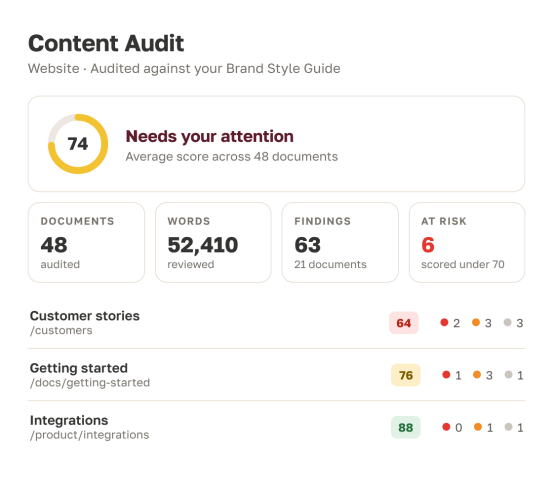
Add your content, run it against your style guide, and get a score for every document. Findings come ranked by severity, so your team knows where to start, and you can run it again anytime.

Content quality has always been easier to debate than to measure. Content Audit applies your standard the same way to every document, every time, so the conversation moves from opinions to scores.
THE SOLUTION
See the quality of your entire library in one audit.
Content Audit checks every document you add against your style guide and turns the results into a prioritized plan of work. Enterprise teams have relied on this capability for years to keep large content libraries on standard. Now it’s built into the Markup AI platform.


A score for everything you’ve already published
Every document gets a quality score, broken down across six goals: Clarity, Consistency, Inclusive language, Scannability, Spelling and Grammar, and Tone. Documents that score below your threashold are flagged as at risk, so you can see in seconds which content needs attention.
Know exactly where to start
Findings are ranked by severity, so your team fixes what matters most first. Each finding points to the exact passage and explains what’s wrong and why. Export any audit to assign and track the work in the tools your team already uses.
Fix it where you write
Open a flagged document in Word or Google Docs, and the Markup AI sidebar checks it against the same style guide. Your writers make fixes in the editor they already know, and nothing changes without a person approving it.
HOW IT WORKS
From scattered content to a prioritized fix list in three steps.
No spreadsheets, no reviewer rotations, no separate audit project.

Add your content
Upload files or whole folders, crawl your website and keep the pages that matter, or connect Google Drive. More content sources are coming soon.
Set your standard
Select your style guide and run the audit. It works in the background, so you can leave the page and come back when it’s done.
Review, prioritize and fix
Review scores and findings document by document, export the results, and fix content in your preferred writing tools.
ROI Value Impact Calculator
See how much time your team gets back for higher-value work when content audits stop being a manual project.
Conservative Annual Savings
Frequently asked questions
Files you upload (PDF, DOCX, PPTX, Markdown, HTML and plain text), pages discovered by crawling your website, and documents in Google Drive. More content sources are on the way.
It checks every document against your style guide and scores it across six goals: Clarity, Consistency, Inclusive language, Scannability, Spelling and grammar, and Tone.
No. Content Audit reads and scores your content; it never edits your source files or live pages. Your team makes changes in Word or Google Docs with the Markup AI sidebar, so you stay in control of what changes.
The sidebar checks one document while you write. Content Audit checks many documents at once, including content that’s already published. Use them together: find issues with an audit, then fix them with the sidebar.
Re-crawl your site to find new, changed and removed pages. Your previous results stay in place until you run the next audit, and every audit is saved to your history.
Yes. Export any audit as a CSV to share findings, assign work and track progress in the tools you already use.
Content Audit is the next generation of the batch checking capability enterprises have used for years, rebuilt for the Markup AI platform.
Content Audit is available as part of Markup AI’s enterprise offering. Let’s chat about your content library and what an audit could show.