
How to find contradictions in your content: Markup AI’s new Accuracy Agent
 • November 3, 2026
Key Takeaways:
- Markup AI’s Accuracy Agent scans entire documents to find contradictions making incompatible claims.
- The tool requires no setup, works on any content, and groups all conflicting locations into one finding.
- Contradictions slip through reviews because they span separate sections written by different people at different times.
- The agent detects eight conflict types including entity, timeline, scope, capability, statistical, and definition contradictions.
- A human always decides which version is correct; the agent never applies fixes automatically.
Every document tells a story. The trouble starts when it tells two.
If you’ve worked in marketing or technical documentation for any length of time, you’ve probably shipped one of these. The pricing page says one thing and the FAQ says another. The intro cites a stat that doesn’t match the stat in the conclusion. Step 6 of a setup guide points back to a step that never did what it claims. None of these are typos. Each sentence is correct on its own. They just aren’t correct together.
Starting today, the Markup AI Accuracy Agent checks for contradictions. It’s part of our Content Guardian Agents℠. It finds the places where your content disagrees with itself before a buyer, a user, or a support ticket does.
Why contradictions slip past every review
Contradictions are some of the hardest errors in content to catch, and the reason is simple. They don’t live in one sentence. They live in the gap between two.
Think about how a typical page comes together. Someone writes the hero copy for the launch. A product team member adds the FAQ a month later. Marketing updates the pricing table when packaging changes. The demand generation team drops in a customer story. Different people write each section, at different times, for different reasons. And every section reads perfectly fine on its own.
A reviewer reads top to bottom. By the time they reach the FAQ, the claim in the pricing table is three scrolls and a few hundred words behind them. Your grammar checker won’t catch it. Your style guide won’t catch it. And your most careful editor probably won’t catch it either, at least not on the 20th piece of the week.
Now add AI to the mix and teams are producing more content, faster, from more contributors than ever. There aren’t enough people to review everything AI produces. Checking every claim against every other claim in a document is exactly the kind of work that breaks down for people as volume grows. It’s also exactly the kind of work a machine can do in seconds.

What the Accuracy Agent now does
The new contradiction check reads your entire document. It finds passages that make incompatible claims about the same subject, places where a careful reader can’t accept everything as written.
Here’s what makes it different:
- It works without setup. There’s no fact library to build, no reference database to maintain, and no settings to configure. The agent checks the document against itself, so it works on any content from the very first run.
- It looks across every kind of claim. It catches products or people described in ways that can’t both be true, dates and sequences that disagree, and conflicting statements about who something is for or what it requires. It also catches statistics stated two ways, key terms that quietly change meaning, and a single flipped word (always vs. never, all vs. only) that turns two sentences into a conflict. It even checks references to figures, tables, and steps.
- It shows you every place involved. If an event date appears three different ways, you get one finding with three locations, not three separate flags. When there’s a clean fix, the agent offers the competing values as choices (2019 or 2015, for example), and each location keeps its own format.
- It verifies before it reports. A separate verification pass confirms each conflict before the agent calls it a contradiction. That keeps the results trustworthy.
- You stay in control. The agent never applies a fix automatically. A person decides which version is right, because only you know whether the pricing page or the FAQ reflects the current truth.
What the contradiction check actually looks for

The examples above are only a sample. Here’s the full list of conflicts the Accuracy Agent now flags:
- Entity conflicts: The same product, company, customer or person is described in two ways that can’t both be true. Example: a customer introduced as “a mid-market outdoor apparel brand” in one section and “the Fortune 500 retailer” in another.
- Timeline conflicts: Dates, durations, ages or sequences that don’t line up. Example: “founded in 2019” on one page and “since our founding in 2015” on another, or a setup step that says “you have not yet connected a CMS” after earlier steps already connected one.
- Scope conflicts: Conflicting statements about who something is for or where it applies. Example: “available in all regions today” next to “available to customers in the United States only.”
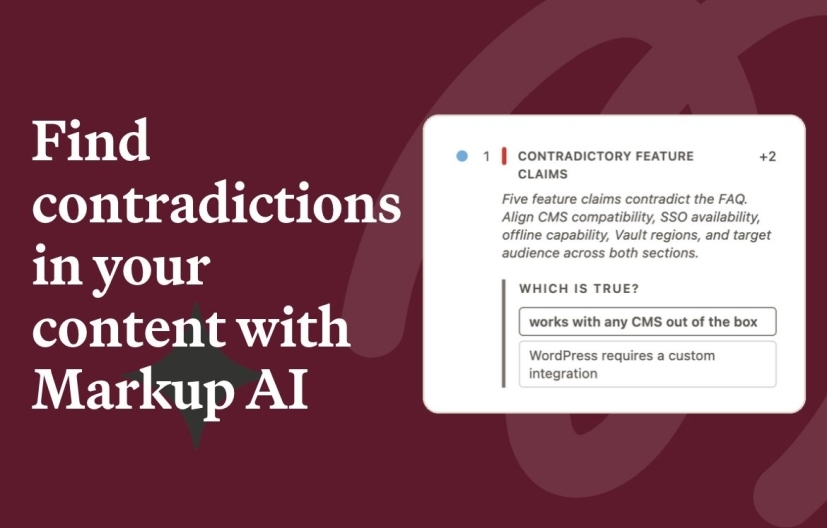
- Capability conflicts: Conflicting statements about what the product does or what it needs. Example: “works with any CMS out of the box, no custom code” next to “WordPress sites require a custom integration built on our REST API.”
- Statistical conflicts: One figure stated with two different values, or one measurement presented as if it were two separate facts. Example: “27% of respondents” and “37% of respondents” for the same survey question.
- Definition conflicts: A key term defined or used in ways that don’t fit together, so the argument falls apart even though no single sentence is wrong. Example: “accuracy means factual correctness” in one section and “accuracy, meaning every piece sounds like the brand” in another.
- One-word flips: A single word like always/never, must/may or all/only makes two statements incompatible. Example: “every plan includes single sign-on” next to “SSO is available on the Enterprise plan only.”
- Broken references: A pointer to a figure, table, section or step that doesn’t exist or points to the wrong place. Example: “see Figure 2” when the document only has Figure 1, or “paste the API key you generated in Step 4” when the key came from Step 2.
- Claim Identification: Finding claims throughout your content that needs references or sourcing such as claimed results, promissory language, and statistics lacking cited sources.
Smart enough to know when it finds a real issue
A contradiction check is only useful if you trust it. Flag everything, and your team will ignore it within a week. So the agent deliberately leaves alone patterns that only look like conflicts: different subjects that share an attribute, before-and-after figures, the same number from different sources, and examples that aren’t exclusions.
- Different subjects that share an attribute. “Founded in 2019” (the company) and “launched in 2021” (the product) aren’t in conflict.
- Before-and-after figures. “Review cycles had averaged 12 days” and “from 12 days to 7.4 days” describe one change, not two competing claims.
- The same number from different sources. A 27% figure from a survey and a 27% figure from a benchmark come from two different studies that happen to land on the same number.
- Examples that aren’t exclusions. A mid-market customer story on a page that calls your product enterprise-grade isn’t a contradiction. It only becomes one if the page says the product is built exclusively for enterprise.
We continue to build more accuracy capabilities into the product
The contradiction check goes broader. It finds conflicts between any two claims, whether they’re about products and people, scope, capabilities, figures, definitions, or references.
The common thread is the type of error. Each of these errors is provably wrong, nearly invisible to someone reading top to bottom, and fast for a machine to catch. Together, these checks keep your content accurate in every claim and ready for AI to cite.
Last updated: November 3, 2026

Continue reading

Markup AI vs. Grammarly Business: Which Fits Enterprise Content Teams?
 • October 30, 2026
Four Truths and a Lie About Content
 • October 27, 2026
How to Avoid Common AEO and GEO Mistakes
• October 23, 2026