
How I Save Time Publishing Video Content Using AI Workflows
 •
October 8, 2025
•
October 8, 2025

Key takeaways:
- Uploading one video can automatically generate a YouTube title, description, and full blog post.
- A single AI workflow handles transcription, content generation, brand alignment, and draft publishing.
- Markup AI ensures AI-generated content follows brand voice, terminology, and style guidelines.
- This process consistently saves two to three hours per video while keeping content accurate and on brand.
If you’re a content creator, owner, or manager, you already know: creating a video is just the beginning. The real time-sink is everything that comes after—writing engaging titles, crafting SEO-friendly descriptions, drafting blog posts, and getting it all distributed. But what if you could automate that entire process and reclaim two to three hours with every single video you publish? In this video, I’m going to show you the exact AI workflows I use to make it happen. I’ll show you how uploading a single video can kick off a whole content creation and distribution system, delivering awesome, brand aligned, and optimized posts to save hours per video with AI automation.
Step 1: Create and upload the video
All that creative energy you put into creation? It can disappear fast when you’re staring at a mountain of post-production. For every video, you need a good YouTube title, a detailed description packed with keywords, a blog post to drive traffic from your website, and more.
Doing it all by hand? Super boring, and it *really* slows down your content speed. Instead of brainstorming your next video, you are copying, pasting, and rewriting. This process addresses that problem head-on. It demonstrates automation that changes a video into ready-to-publish items. This lets you focus on creating.
Step 2: Create the automation engine With Zapier
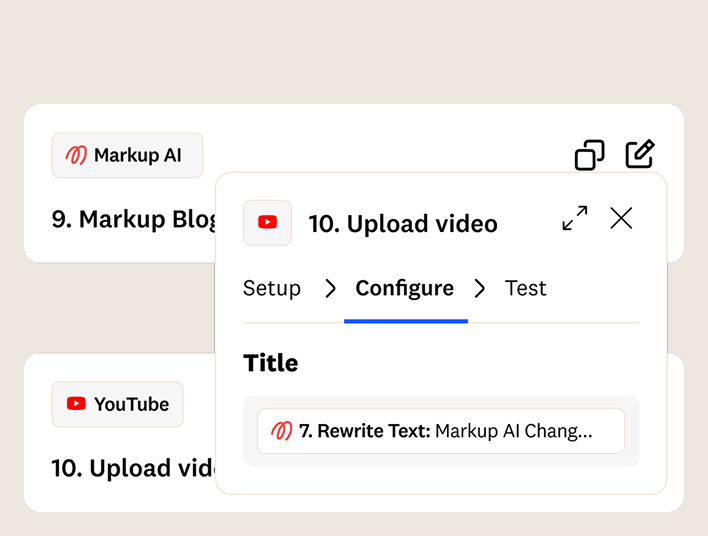
The secret sauce here is an automation tool called Zapier. I’ve built a “Zap” (that’s what they call it) that’s basically the brain of this whole operation.
It all starts the moment I upload a new video file into a specific Google Drive folder. You’ll see how one little upload starts a chain reaction. Zapier automatically finds the file, processes it, and sends it through a series of AI tools designed to handle each specific task. This isn’t just some idea; it’s a real, step-by-step guide that links different apps into one smooth, automatic process.
Forget doing five different things yourself — I’ll show you how to let the automation do the work for you.
Step 3: Convert the video to text and generate content
So, how can an AI write about a video it hasn’t even “seen?” The secret is in the audio.
First, I turn the video into an MP3 and send it to ChatGPT to get transcribed into text. This text becomes the source source for the entire operation.
Then, with the written record ready, the system sends it to Google’s Gemini with instructions to generate.
- A cool YouTube title
- A detailed 600-word YouTube description
- A full blog post draft
This is where the magic happens: The AI looks at your video and creates awesome written stuff to get people watching and boost your search ranking.
Step 4: Ensure everything is on-brand with Markup AI
Worried that AI will make your stuff sound like a robot, without your own style and terms? That’s why Markup AI is so important here.
After Gemini makes the first version, everything goes to Markup AI for a final check. Inside Markup AI, I’ve uploaded;
- My company’s style guide — a PDF that explains the tone and style of our company.
- I’ve also added a list of our special words to make sure we always use the right terms.
This makes sure the AI doesn’t just make stuff up; it creates content that follows your brand voice, clarity and terminology requirements.
Step 5: Publish automatically to YouTube and WordPress
Once Markup AI has made the content perfect, the automation does its last thing: it puts it out there.
The system grabs the title and description and puts them right on our YouTube channel, making a draft video that’s ready for me to check. Simultaneously, it sends the blog post title, the blog post itself, and the YouTube link to my WordPress site, saving the draft there too.
In about 15 minutes, a video file on my computer turns into a ready-to-go YouTube video and a blog post, all without me doing anything.
If you have any questions about how I setup this process, please don’t hesitate to reach out!
And if you want to start scanning, scoring, and rewriting your human and AI generated content to meet your brand guidelines, you can get started for free here.
Frequently Asked Questions (FAQs)
How long does this AI publishing workflow take to run?
From upload to draft publishing, the entire process typically takes about 15 minutes.
Do I still need to review content before it goes live?
Yes. All content is saved as drafts so you can review and approve everything before publishing.
Is this workflow about creating videos with AI?
No. This process focuses on automating everything after the video is created, including titles, descriptions, and supporting blog content.
Last updated: May 5, 2026
Christopher Carroll
Continue reading

Say Goodbye to Robot Prose With Content Integrity Agents
 •
August 27, 2026
•
August 27, 2026


Markup AI Shortlisted in The 2026 A.I. Awards
•
August 25, 2026